Make the action explicit
Give a useful task a precise name, description and input schema. “Check an order” is more meaningful than “click this button”.

WEBMCP LAB · REAL-WORLD EXPERIMENTS
WebMCP gives a website a way to describe the actions it can perform, so a compatible browser agent can discover a clear tool instead of guessing what a button or form might do. The opportunity is not another chatbot. It is getting a real task done—with the person still in control.
THE IDEA
A WebMCP-enabled page can expose named, structured tools from its own application logic. A compatible agent can inspect the tool description and input schema, then request the action in the context of the page. The website still owns its accounts, data, validation and business rules.
Give a useful task a precise name, description and input schema. “Check an order” is more meaningful than “click this button”.
A compatible agent can discover the tools the current page exposes, including the information needed to call them.
The tool calls the site's own client-side application logic. The backend must still enforce identity, permissions and validation.
WebMCP is a browser API for page-level tools. It is related to MCP, but it is not a replacement for backend MCP servers, APIs or integrations. It does not automatically make every website agent-ready.
A GROWING SET OF POSSIBILITIES
This Babushka illustration supplied with the project shows the idea of capabilities growing across widgets, extensions and websites. Treat it as a conceptual map—not a WebMCP specification, feature checklist or statement that every illustrated capability exists today.
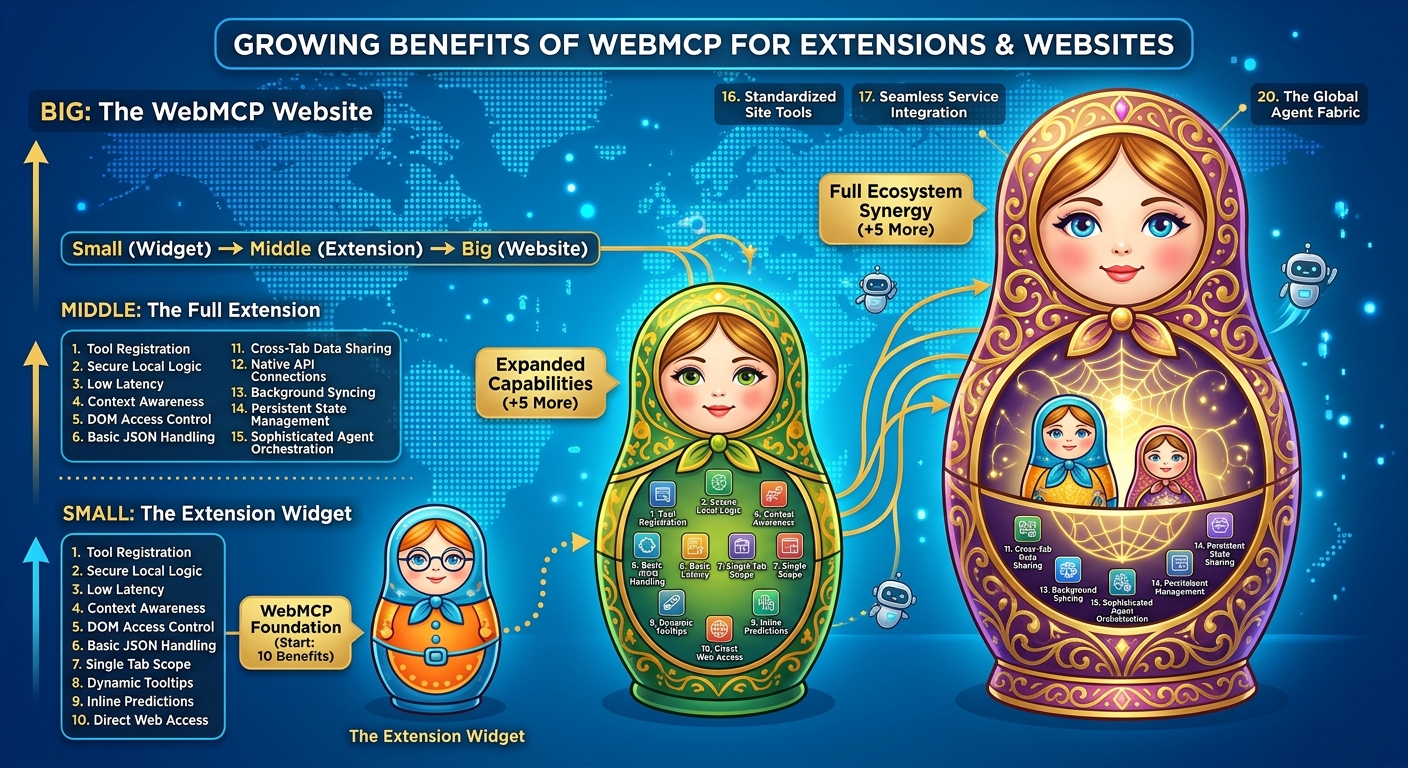
Start with one useful, bounded action. Add context, state and integration only when a real workflow needs them. Keep the same principles at every scale: clear intent, permission boundaries, reliable execution and evidence.
Project concept artwork · not an official Chrome or W3C diagram
OUR TRIAL USE CASES
These are research directions for web.mcp. A compatible browser and agent must expose and support the relevant action before it can be used.
Find the right content, coordinate information across services or carry a journey forward without adding more screen work. In-car interactions remain hands-free and defer complex or consequential steps until safely parked.
Compare options, prepare forms, coordinate messages and update records. The service owner retains identity, permissions and final control; consequential actions stay with the person for approval.
Remember preferences, understand timings and organise plans. The official ticketing provider retains control of authentication, queues, bot protection, inventory, limits and checkout.
RULES OF THE LAB
These are our implementation and evaluation rules for every experiment—not a claim that the draft specification mandates every item.
Use specific verbs and atomic actions. Avoid overlapping tools and vague “do everything” commands.
Use clear names, types, enums and parameter descriptions. Accept natural user input where practical; validate it in code.
Separate looking up information from changing state. Mark read-only tools accurately and keep write actions explicit.
Purchases, payments, bookings, cancellations, submissions, messages and account changes require clear review and approval.
Respect sign-in, identity checks, queues, rate limits, bot protections, inventory, payment and checkout rules.
Prices, stock, availability, eligibility and workflow state can change. Revalidate the current state at the point of action.
Use least privilege, minimise personal data, keep secrets out of page code and respect same-origin and session boundaries.
Tool descriptions, third-party text and returned content can contain prompt-injection attempts. Do not let data become authority.
Return clear errors, handle rate limits, prevent duplicate side effects and let the person recover through the normal interface.
Do not report success because a tool was registered or called. Check the resulting application state and record what actually happened.
Maintain an accessible, usable website and a manual fallback. WebMCP should enhance the interface, not make it inaccessible.
Record discovery, completion, latency, errors, retries, corrections and approval—not just the number of tool calls.
THE ECOSYSTEM
These logos identify the technologies, browser projects and community resources relevant to the experiment. They do not indicate sponsorship, partnership, certification or endorsement of web.mcp.
 Google ChromeOrigin Trial and browser implementation
 Google for DevelopersWebMCP guides, best practices and feedback
W3CW3CWeb Machine Learning Community Group draft
 GitHubSpecification source, issues and discussion
W3C hosts the Web Machine Learning Community Group but does not endorse the group's work or the websites linked here. The WebMCP draft is not a W3C Standard or on the W3C Standards Track. Browser and API support can change; check the current primary documentation before relying on it.
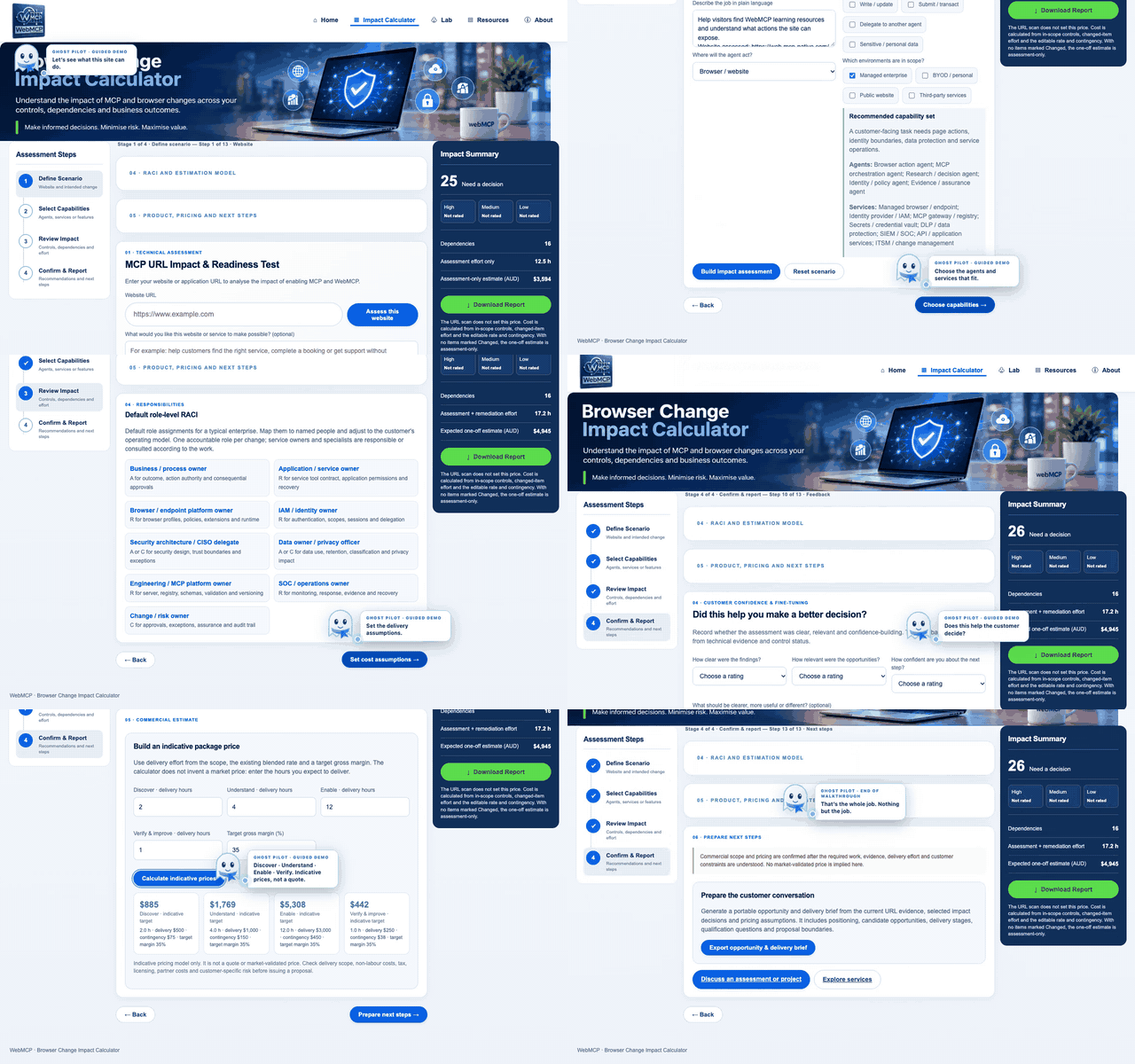
WATCH THE CALCULATOR
See the real calculator move from a public URL scan through impact decisions, ownership, evidence, an indicative cost and the next-step brief.
TRY THE EXPERIMENT
Use the browser’s available WebMCP tooling to inspect declared page actions and compare tool results with the visible application state. Treat a missing browser API as unsupported, not as a passing test.